
Run locally
Flyte runs locally with no cluster or Docker needed. Install the SDK, write tasks, and run them on your machine. When you’re ready to scale, drop the --local flag and the same code runs on a remote cluster with GPUs.
Getting started
If you haven’t already, install the SDK and configure local persistence as described in the Quickstart.
Running tasks locally
The --local flag tells Flyte to execute a task in your local Python environment rather than on a remote cluster. Add --tui to launch the interactive Terminal UI for real-time monitoring.
Basic local execution:
flyte run --local hello.py mainWith the interactive TUI:
flyte run --local --tui hello.py mainYou can also run tasks programmatically using the Python SDK with flyte.run(). See
Run and deploy tasks for details.
Two ways to run a task
There are two distinct ways to run a task, and it’s easy to confuse them when you’re new. They differ in who calls flyte.run().
As a script: python hello.py
You call flyte.run() yourself, from inside an if __name__ == "__main__": block, and execute the file with plain Python:
# hello.py
import flyte

env = flyte.TaskEnvironment(name="hello_env")

@env.task
def main(x_list: list[int] = list(range(10))) -> float:
    return sum(x_list) / len(x_list)

if __name__ == "__main__":
    flyte.init_from_config()       # load your local config (.flyte/config.yaml)
    run = flyte.run(main)          # call the task; pass inputs as keyword args
    print(run.name)
    run.wait()
Then run the file as an ordinary Python script:
python hello.pyBecause your code decides which task runs and with what inputs, you pass inputs directly as arguments to flyte.run() — for example flyte.run(main, x_list=[1, 2, 3]). Use flyte.run.aio(...) from within async code.
Via the CLI: flyte run
The flyte run CLI does the calling for you. You don’t need a __main__ block — instead you name the file and the task on the command line, and the CLI invokes it:
flyte run --local hello.py mainThe task’s parameters become CLI options. Each task input maps to a --<name> flag (run flyte run --local hello.py main --help to see them, with their defaults). For example, to override x_list:
flyte run --local hello.py main --x-list '[1, 2, 3]'A common first-run trip-up: invoking flyte run against a task whose inputs have no defaults without supplying them. The CLI then can’t construct the input and you’ll see a confusing type-converter error rather than a “missing argument” message. If you hit one, check --help and pass the required --<name> values (or give the parameters defaults in the task signature, as main does above).
Terminal UI
The TUI is an interactive split-screen dashboard. Task tree on the left, details and logs on the right.
flyte run --local hello.py main
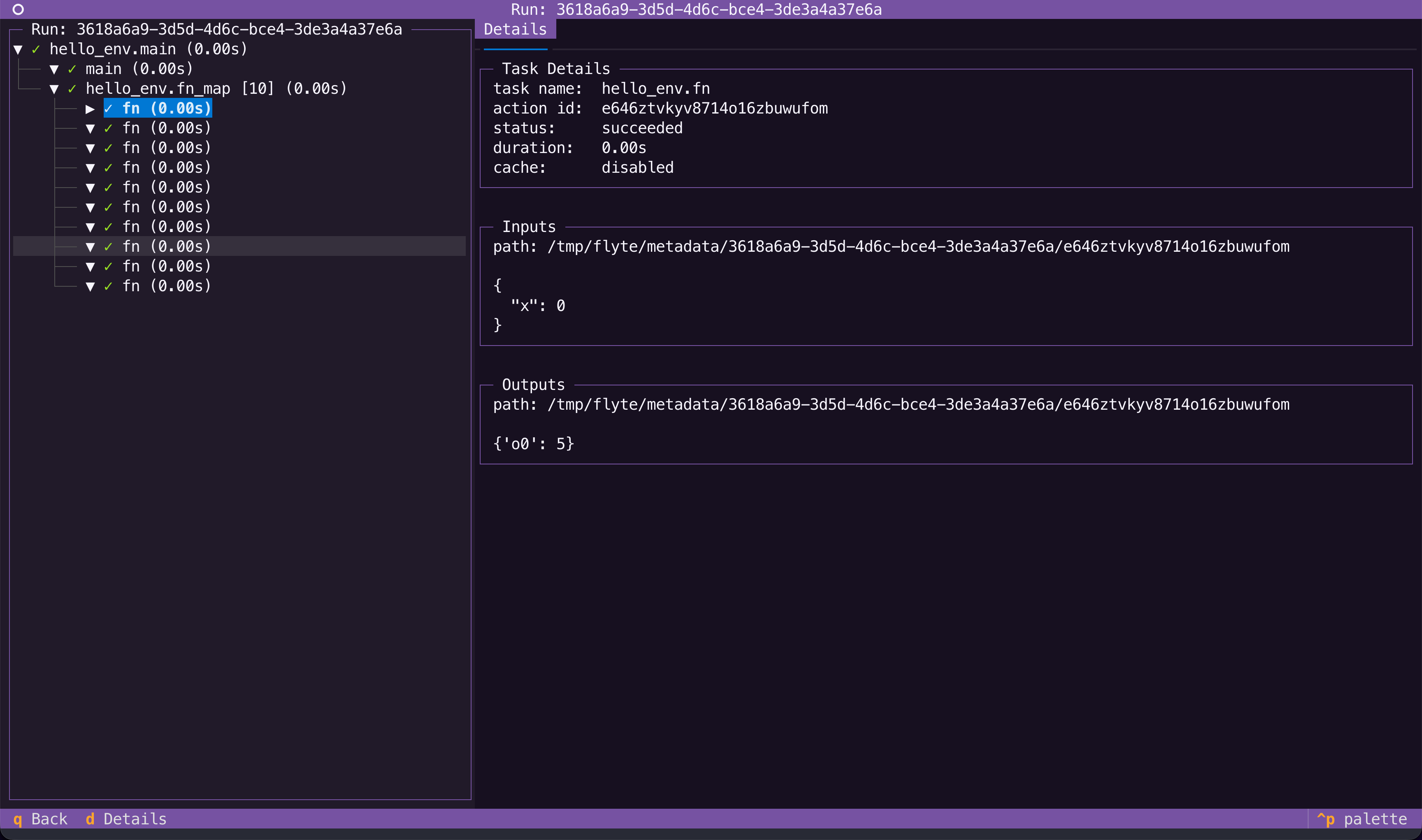
What you see:
- Task tree with live status:
●running,✓done,✗failed - Cache indicators:
$cache hit,~cache enabled but missed - Live logs:
print()output streams in real time - Details panel: inputs, outputs, timing, report paths
- Traced sub-tasks: child nodes for
@flyte.tracedecorated functions
Keyboard shortcuts:
| Key | Action |
|---|---|
q |
Quit |
d |
Details tab |
l |
Logs tab |
Exploring past runs
If you created a config file via flyte create config --local-persistence, Flyte
persists the inputs and outputs of every task run locally, so you can always go back and inspect what a task received and produced. Launch the TUI on its own to browse past runs, compare inputs and outputs, and review reports:
flyte start tuiWhat works locally
Most Flyte features work in both local and remote execution. The table below summarizes how each feature behaves locally.
| Feature | Local behavior | Details |
|---|---|---|
| Caching | Outputs stored in local SQLite, keyed on task name and inputs. Same inputs = instant results. | Caching |
| Tracing | @flyte.trace functions appear as child nodes in the TUI with their own timing, inputs, and outputs. |
Traces |
| Reports | HTML files saved locally. TUI shows the file path. | Reports |
| Serving | Run apps locally with python serve.py or flyte.with_servecontext(mode="local"). |
Serve and deploy apps |
| Plugins | Same decorators and APIs as remote. Secrets come from environment variables. | Integrations |
| Secrets | Read from .env files or environment variables. No flyte create secret needed. |
Secrets |
Local to devbox/remote
The same code runs in both environments. Here’s what changes:
| Aspect | Local | Devbox/Remote |
|---|---|---|
| Run pipeline | flyte run --local |
flyte run |
| TUI | --tui flag |
Dashboard in Flyte UI |
| Caching | Local SQLite | Cluster-wide distributed cache |
| Reports | Local HTML files | Rendered in the Flyte UI |
| Serving | python serve.py |
flyte deploy serve.py env |
| Secrets | .env / environment variables |
flyte create secret / flyte.Secret |
| Compute | Your CPU/GPU | Resources(cpu=2, memory="4Gi", gpu=1) |
The
TaskEnvironment is the bridge. Locally, image and resource settings are ignored. On the cluster, Flyte builds containers and allocates compute from the same definition.
Next steps
- Run on the devbox: Run a full local Flyte cluster with Docker to test containerized execution before deploying remotely.
- Run on a remote cluster: Configure the CLI and SDK to run on a remote Flyte cluster.